
Download Radioplayer – Free Radio Streaming with Powerful Features
Overview
Radioplayer for TV is a free Android application developed by Radioplayer Worldwide, designed to deliver seamless radio streaming directly to smart TVs and compatible devices. The software serves as a centralized hub for accessing live radio stations across the country, offering users a straightforward way to tune in to music, news, sports, and podcasts without requiring a sign-in or enduring intrusive advertisements. As the official radio app backed by major broadcasters, it provides direct access to high-fidelity audio streams, ensuring a premium listening experience.
The target audience includes general consumers, music enthusiasts, sports fans, and anyone seeking a reliable, ad-free radio experience on their television. Use cases range from background music during daily routines to real-time sports commentary and on-demand podcast listening. The app supports a broad spectrum of genres, including pop, rock, indie, dance, jazz, soul, and classical, making it suitable for diverse listening preferences.
Its focus on direct broadcaster integration ensures authenticity and reliability in content delivery. The developer did not provide additional details about the app’s development history or organizational background beyond its name.
Key Features & Capabilities
- Free Live Radio Streaming – Access thousands of radio stations across the UK without subscription fees or account creation. Ideal for users seeking uninterrupted audio content.
- High-Fidelity Audio Streams – Delivers hi-fi quality audio directly from broadcasters, enhancing clarity and depth for listeners using high-end speakers or TVs.
- Favorite Stations Management – Allows users to save and organize preferred stations for quick and easy access during future sessions.
- Smart Search & Discovery – Features an intelligent search function and personalized recommendations to help users find new stations based on genre, location, or content type.
- Genre Diversity – Offers a comprehensive selection of music and talk formats, including pop, rock, jazz, classical, and sports coverage.
- Live Sports Coverage – Provides real-time commentary for major events such as football and rugby, accessible without additional costs or subscriptions.
These features collectively support efficient content discovery and consistent listening habits. For instance, users can save favorite stations during a commute and resume playback later on their TV. The recommendation engine aids in exploring new content, particularly beneficial for listeners seeking niche genres or regional programming. The direct broadcaster integration ensures that audio quality and content accuracy are maintained, eliminating third-party delays or compression artifacts.
User Interface, Workflow & Performance
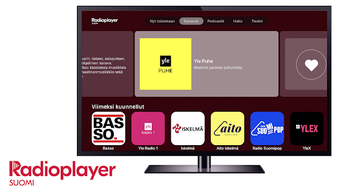
The user interface of Radioplayer for TV is designed with simplicity and functionality in mind, featuring a clean layout that emphasizes accessibility and ease of navigation. Main sections such as genre categories, favorite stations, and search are clearly labeled and arranged for intuitive use. Navigation is streamlined through a bottom menu bar, allowing users to switch between core functions with minimal effort.
The workflow is efficient, enabling users to find a station, start playback, and save it as a favorite in just a few taps. The app’s responsiveness appears consistent with standard Android app behavior, though exact performance metrics were not specified. The developer did not provide details on CPU or RAM usage, nor did they share information about background operation or battery impact.
Stability is expected to align with typical Android applications, but real-world behavior may vary based on device hardware and network conditions. General software behavior patterns suggest smooth operation under normal conditions, with minimal lag during navigation or station switching.
Compatibility & System Requirements
Radioplayer for TV is compatible with Android devices, supporting the operating system as specified. The app is available in version 2.5.1 and has a file size of 24.3 MB, indicating a lightweight footprint suitable for most modern Android devices. Installation is straightforward, requiring no additional software or system modifications.
The developer did not specify minimum hardware requirements such as RAM, processor type, or storage space. Compatibility information was partially provided, with no details on supported Android versions beyond the platform itself. Users are advised to ensure their device meets general Android app requirements to avoid installation issues.
The app does not appear to require a specific screen resolution or hardware acceleration, but exact compatibility details were not listed.
Pros and Cons
Pros
- Free to download and use with no hidden fees or subscriptions
- Direct access to high-quality audio streams from official broadcasters
- Extensive genre and content variety, including live sports and podcasts
- Simple, intuitive interface optimized for TV and remote control use
- Supports saving favorite stations for quick access
- Offers personalized recommendations and smart search functionality
Cons
- Only available on Android, limiting access for users on other platforms
- Exact system requirements and performance impact were not disclosed
- No offline mode or download functionality mentioned
- Dependent on internet connectivity for all streaming features
- Limited customization options for interface layout or playback settings
FAQ Section
Is Radioplayer for TV available on iOS or other platforms?
As of now, the app is only available for Android devices. There is no official version for iOS or other operating systems.
Is the app safe to download and use?
Yes, Radioplayer for TV is developed by Radioplayer Worldwide, a trusted entity backed by major broadcasters. It is free from malware and does not require user registration, reducing privacy risks.
How often are updates released?
Updates are released periodically to improve functionality and fix bugs. The current version is 2.5.1, with the latest release date provided as 2024-08-22.
Does Radioplayer for TV require a license or subscription?
No, the app is completely free to use. There are no subscription fees, in-app purchases, or required sign-ins.
Can I use Radioplayer for TV without an internet connection?
No, the app requires a stable internet connection to stream live radio content. It does not support offline playback or downloaded content.
Final Thoughts
Radioplayer for TV stands out as a reliable, free solution for streaming high-quality radio content directly from official broadcasters. Its clean interface, extensive content library, and strong focus on audio fidelity make it a top choice for users seeking a seamless listening experience on their smart TVs. The ability to save favorites, discover new stations, and access live sports coverage without ads or subscriptions adds significant value.
While the app is currently limited to Android and lacks detailed system specifications, its core functionality remains robust and user-focused. For consumers who prioritize authenticity, ease of use, and a broad range of genres, Radioplayer for TV delivers a compelling experience. Download Radioplayer now and enjoy free, high-quality radio streaming with powerful features.







